Showing posts with label Cassandra. Show all posts

Thursday, February 23, 2017

Cassandra logs/time series storage design - optimal compaction strategy

Please find the updated version of this post here: https://piotr.westfalewicz.com/blog/2017/02/cassandra-logs/time-series-storage-design---optimal-compaction-strategy/

Source: http://www.ccpixs.com/
Let's assume you are considering using Cassandra for logs storage or in general, for time series storage. Let's assume your usage pattern is that you store insane amounts of data for three months and you query them rarely, usually when something goes wrong and you need to investigate why. So, you have made business analysis. You have made technical analysis. You made performance benchmarks. You identified clustering and partition keys. You picked the right hardware. You tested how the cluster responds to peaks. You tested the cluster for minute, hour surges. You have been running the cluster in tests for weeks. You are now ready to deploy system to the production. You are now ready to fail in ~one month. Wait, what?!

Of course, all mentioned steps bring you closer to the success. It's good that there are plenty of great resources on how to design time series model in Cassandra. Just google "time series design Cassandra".

Surprisingly, the first five of them (dunno about others), don't mention setting the right compaction strategy.

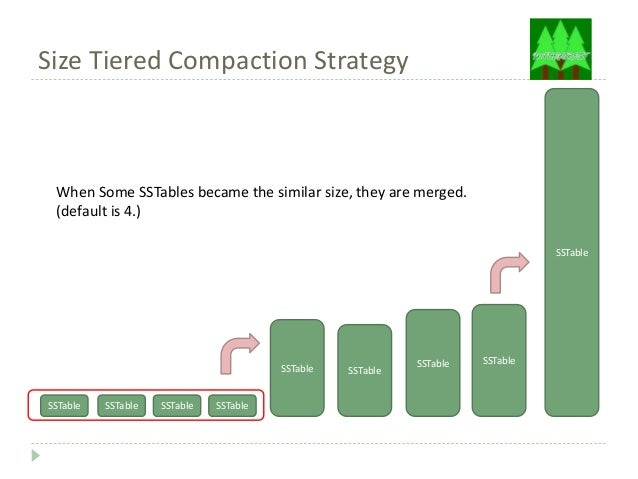
The default compaction strategy (Size Tiered Compaction Strategy)

Source: https://www.slideshare.net/tomitakazutaka/cassandra-compaction
The default compaction strategy triggers a compaction when multiple SSTables of a similar size are present. To emphasize how evil is that for log storage scenario, let's assume that a week of production logs results in 1x 168GB SSTable, 3 x 42GB SSTables, 3 x 10GB SSTables, etc. After two weeks, the biggest SSTable will be probably still 168GB . That's fine. You have tested the cluster for two weeks of production load, right? The trap is, you want to store logs for three months. Nobody will spend that amount of time hitting the test cluster with production load. After three months, the biggest SSTable will be around 672GB and month after that probably 2688GB. The compaction isn't free. It takes your CPU, it takes your disc IOPS (yes, nice sequential writes, but still). It will take your life (or rather kill your cluster with pending compactions).

Solution: Date Tiered Compaction Strategy

Source: http://www.datastax.com/dev/blog/datetieredcompactionstrategy 
The date tiered compaction strategy will simply leave, after some time, old SSTables untouched. The same situation described above will translate to having (depending on your use case) for example 10x ~268GB SSTables, or perhaps 100x ~26GB SSTables. No killing compactions on old data! Read about the details here: DateTieredCompactionStrategy: Compaction for Time Series Data and here: Date-Tiered Compaction in Apache Cassandra. Yes, queries probably will be a little bit slower.

All in all, invoking this CQL (with carefully chosen consts), will save your cluster:
ALTER TABLE myprecouslogs.myprecioustable WITH compaction = { 'class' :  'DateTieredCompactionStrategy', 'base_time_seconds':'XXX', 'max_sstable_age_days':'YYY' }
and here is how to do it on a live organism: How to change Cassandra compaction strategy on a production cluster.

BTW. Do you know that there is also anticompaction?

Tuesday, September 6, 2016

Cassandra Datastax C# Driver problems - solution

Please find the updated version of this post here: https://piotr.westfalewicz.com/blog/2016/09/cassandra-datastax-c-sharp-driver-problems---solution/


In the previous post I've described a strange problem related to Cassandra Datastax C# Driver which was happening once in the production environment. It's time to reveal the mystery.

Two root causes

1.

One of the hidden, but important metric, which you won't find usually in your logs is the CPU usage. What important is that the connection setup to the Cassandra cluster consists of many small steps. In production, when there was a very high CPU usage (around 100% - for reason known and already eliminated), the connection setup process was timing out in such a moment, that the final result was reported as NoHostAvailableException. This shows, how important is to track and prevent 100% CPU usage.

2.

But why, let me quote myself:
Things get back to normal after the client restart... and gets back to madness few hours later, at higher load. Incredible high number of NoHostAvailableExceptions, like almost any connection to the Cassandra fails.
The problem is here:
private readonly Cluster _cluster;
private readonly ConcurrentDictionary<string, Lazy<ISession>> _sessions; //lockless session cache

public ISession GetSession(string keyspaceName)
{
    if (!_sessions.ContainsKey(keyspaceName))
    {
        _sessions.GetOrAdd(keyspaceName, key => new Lazy<ISession>(() => _cluster.Connect(key)));
    }
    var result = _sessions[keyspaceName];
    return result.Value;
}
Do you see it? It turns out that when an exception is thrown in _cluster.Connect(key) method, the Lazy<T> will cache this exception. Therefore all invocations to Lazy<T>.Value will result in the same, cached exception instead of retrying the connection to the Cassandra cluster. If you are planning to use the Lazy<T> class, there are more "gotchas". Read the documentation on MSDN.

Lessons learned?


  1. CPU usage is very, very important and critical metric. Do not ignore it, as it may lead to numerous, strange errors.
  2. RTFM! Read the documentation when using any class for the first time. Especially when copying&pasting code from the StackOverflow.

Tuesday, August 30, 2016

Cassandra Datastax C# Driver problems - NoHostAvailableException

Please find the updated version of this post here: https://piotr.westfalewicz.com/blog/2016/08/cassandra-datastax-c-sharp-driver-problems---nohostavailableexception/


This post will be about my journey with fixing nasty Cassandra Datastax C# driver problem, which took me a lot more time than expected...
Credits: wikimedia

Once upon a time, I've been fixing following exception:
Cassandra.NoHostAvailableException: None of the hosts tried for query are available (tried: x.x.x.x:9042, x.x.x.x:9042, x.x.x.x:9042)
   at Cassandra.ControlConnection.Connect(Boolean firstTime)
   at Cassandra.Cluster.Connect(String keyspace)
   at Company.Code.CassandraSessionCache.GetSession(String keyspaceName)
   at Company...
The CassandraSessionCache looked like this:
public class CassandraSessionCache
{
    private readonly Cluster _cluster;
    private readonly ConcurrentDictionary<string, Lazy<ISession>> _sessions; //lockless session cache

    public CassandraSessionCache(Cluster cluster)
    {
        _cluster = cluster;
        _sessions = new ConcurrentDictionary<string, Lazy<ISession>>();
    }

    public ISession GetSession(string keyspaceName)
    {
        if (!_sessions.ContainsKey(keyspaceName))
        {
   _sessions.GetOrAdd(keyspaceName, key => new Lazy<ISession>(() => _cluster.Connect(key)));
        }
        var result = _sessions[keyspaceName];
        return result.Value;
    }
}
Nothing fancy, however let me give you an insight about the architecture and circumstances of the error:
  • Cassandra cluster is in Amazon
  • The client is Cassandra Datastax C# Driver 2.6.0, also on server in Amazon
  • Both the client and the Cassandra cluster is the same Amazon Region
  • Amazon Region had no availability issues during given period
  • The solution was working fine for over 1 month! The client process is being restarted ~every week for various reasons
  • The client follows Cassandra Datastax C# Driver Best Practices
  • Heartbeat is turned on, so the connection should be alive, all the times
  • Things get back to normal after the client restart... and gets back to madness few hours later, at higher load. Incredible high number of NoHostAvailableExceptions, like almost any connection to the Cassandra fails.
  • Of course, it works on my machine®

What didn't happen?

There are plenty of questions about Cassandra.NoHostAvailableException on StackOverflow. So let's get through some of them and exclude them:
  • [1], [2] - no, because following C# Driver best practices excludes this
  • [3] - no, because we are using default retry strategy from driver version 2.6.0
  • [4], [5], [6] - no, because we are able to connect to the Cluster at the beginning
  • [7] - no, because we are not misusing batches

Debugging...

Logs on server revealed that the client closed the connection:
INFO  [SharedPool-Worker-3] yyyy-mm-dd 11:04:45,625 Message.java:605 - Unexpected exception during request; channel = [id: 0x9eaf52c5, /x.x.x.x:y :> /x.x.x.x:9042]
java.io.IOException: Error while read(...): Connection reset by peer
  at io.netty.channel.epoll.Native.readAddress(Native Method) ~[netty-all-4.0.23.Final.jar:4.0.23.Final]
  at io.netty.channel.epoll.EpollSocketChannel$EpollSocketUnsafe.doReadBytes(EpollSocketChannel.java:675) ~[netty-all-4.0.23.Final.jar:4.0.23.Final]
  at io.netty.channel.epoll.EpollSocketChannel$EpollSocketUnsafe.epollInReady(EpollSocketChannel.java:714) ~[netty-all-4.0.23.Final.jar:4.0.23.Final]
  at io.netty.channel.epoll.EpollSocketChannel$EpollSocketUnsafe.epollRdHupReady(EpollSocketChannel.java:689) ~[netty-all-4.0.23.Final.jar:4.0.23.Final]
 at io.netty.channel.epoll.EpollEventLoop.processReady(EpollEventLoop.java:329) ~[netty-all-4.0.23.Final.jar:4.0.23.Final]
 at io.netty.channel.epoll.EpollEventLoop.run(EpollEventLoop.java:264) ~[netty-all-4.0.23.Final.jar:4.0.23.Final]
 at io.netty.util.concurrent.SingleThreadEventExecutor$2.run(SingleThreadEventExecutor.java:116) ~[netty-all-4.0.23.Final.jar:4.0.23.Final]
 at io.netty.util.concurrent.DefaultThreadFactory$DefaultRunnableDecorator.run(DefaultThreadFactory.java:137) ~[netty-all-4.0.23.Final.jar:4.0.23.Final]
 at java.lang.Thread.run(Thread.java:745) [na:1.7.0_80]
While the message on the client says that there are no hosts available, what is confirmed by debug logs on the client side. Pretty interesting, huh? Being confused, I've decided to give an update from 2.6.3 to 2.7 a try... but that didn't help.
Accoring to yet another issue regarding NoHostsAvailableException on StackOverflow I've started to log whole exception, with serialized errors property. This is what I've logged:
System.Exception: NoHostAvailableException happened. Errors: {
  "x.x.x.x:9042": {
    "NativeErrorCode": 10060,
    "ClassName": "System.Net.Sockets.SocketException",
    "Message": "A connection attempt failed because the connected party did not properly respond after a period of time, or established connection failed because connected host has failed to respond",
    "Data": null,
    "InnerException": null,
    "HelpURL": null,
    "StackTraceString": "   
  at Cassandra.Connection.<Open>b__9(Task`1 t)
  at System.Threading.Tasks.ContinuationResultTaskFromResultTask`2.InnerInvoke()
  at System.Threading.Tasks.Task.Execute()",
    "RemoteStackTraceString": null,
    "RemoteStackIndex": 0,
    "ExceptionMethod": "8\n<Open>b__9\nCassandra, Version=2.7.0.0, Culture=neutral, PublicKeyToken=10b231fbfc8c4b4d\nCassandra.Connection\nCassandra.AbstractResponse <Open>b__9(System.Threading.Tasks.Task`1[Cassandra.AbstractResponse])",
    "HResult": -2147467259,
    "Source": "Cassandra",
    "WatsonBuckets": null
  },
  "x.x.x.x:9042": {
    "NativeErrorCode": 10060,
    "ClassName": "System.Net.Sockets.SocketException",
    "Message": "A connection attempt failed because the connected party did not properly respond after a period of time, or established connection failed because connected host has failed to respond",
    "Data": null,
    "InnerException": null,
    "HelpURL": null,
    "StackTraceString": "
  at Cassandra.Connection.<Open>b__9(Task`1 t)
  at System.Threading.Tasks.ContinuationResultTaskFromResultTask`2.InnerInvoke()
  at System.Threading.Tasks.Task.Execute()",
    "RemoteStackTraceString": null,
    "RemoteStackIndex": 0,
    "ExceptionMethod": "8\n<Open>b__9\nCassandra, Version=2.7.0.0, Culture=neutral, PublicKeyToken=10b231fbfc8c4b4d\nCassandra.Connection\nCassandra.AbstractResponse <Open>b__9(System.Threading.Tasks.Task`1[Cassandra.AbstractResponse])",
    "HResult": -2147467259,
    "Source": "Cassandra",
    "WatsonBuckets": null
  }
}
Unfortunately, no interesting data is here.

So what could possibly go wrong?

Can you spot the error? I couldn't. Any guesses? Find the answer in next post.

Sunday, May 22, 2016

The five stages of coming to terms with Cassandra

From Wikimedia Commons, the free media repository
The five stages of coming to terms with JavaScript are:
  1. Denial: “I won’t need this language.”
  2. Anger: “Why does the web have to be so popular?”
  3. Bargaining: “OK, at least let me compile a reasonable language to JavaScript.”
  4. Depression: “Programming is not for me, I’ll pursue a career in masonry, like I always wanted.”
  5. Acceptance: “I can’t fight it, I may as well prepare for it.”

The same is with Cassandra - however, IMO in the opposite order:
  1. Acceptance: “I will use Cassandra. It's... AMAZING! Let me just quote Apache Cassandra landing page:"
       The Apache Cassandra database is the right choice when you need scalability and high availability without compromising performance. Linear scalability and proven fault-tolerance on commodity hardware or cloud infrastructure make it the perfect platform for mission-critical data.
  2. Depression: “Damn, it's so well designed, but a complex piece of software and it doesn't work as expected.”
  3. Bargaining: "OK, at least let me try to tune it or report some bugs.”
  4. Anger: “Why is it so popular? Why it has so good PR?”
  5. Denial: “I won’t use it or recommend it ever again.”

The context

I've done the research, checked multiple websites - read about performance, architecture, hosting, maintenance, TCO, libraries, popularity... and Cassandra seemed to be a good database for time-series logs storage, with 95% writes (with SLA) and only 5% reads (without SLA). I've chosen prepared Cassandra Datastax virtual disk image on Amazon with bootstrap scripts, made a proof-of-concept solution and read a book or two about Cassandra. All seemed good. However, it's not post about the good. So ...fast forward...

The bad

Some stories which I remember:
  • Cassandra cluster is on production (along with pararell, old solution for this purpose). Phone rings at 2AM. C* cluster is down. Quick look at logs - OutOfMemoryException in random place in JVM. Outage time: 1h - let me just remind you "proven fault-tolerance". Cluster restart, it works again.
  • Next day at work, random hour, the same thing. Related bug: OutOfMemoryError after few hours from node restart 
  • After few days... firing repair - the standard C* operation, which you have to run at least every gc_grace_seconds, by default 10 days. Usually it worked, but then, unexpectedly the server died and later again and again, related issue: "Unknown type 0" Stream failure on Repair. Outage time: stopped counting.
  • Because of the failing servers in the cluster I decided to scale it out a little. Unfortunately, the issue above also made the scaling impossible.
  • After a while, I've encountered a second (thrid?) problem with the repair. Related bug: Repair session exception Validation failed

Fail

Let's get back to the landing page:
The Apache Cassandra database is the right choice when you need scalability and high availability without compromising performance. Linear scalability and proven fault-tolerance on commodity hardware or cloud infrastructure make it the perfect platform for mission-critical data.
Now, let's see at critical JIRA issue dates:
This means that for around one month at least few people could scale or repair their Cassandra clusters. I fully understand - it's free and Open-Sourced-Software. However, even if something it's free you expect it to work - that's the harsh reality. If it doesn't work just you look for something else. No offence Cassandra Datastax/Apache teams, you are doing truly amazing work, however in resilient software, stability is a TOP 1 requirement. 

Maybe it's me? Maybe I'm the only one having problems?

Fortunately (for me) not:
  1. Here is a presentation how guys at Adform switched from Cassandra to Aerospike: Big Data Strategy Minsk 2014 - Tadas Pivorius - Married to Cassandra
  2. My friend working at a different company also told me, that they used Cassandra and they abandoned it.
  3. Just looked at linked issues and the number of watchers.
In all cases the problems were similar to mine.

Sunday, March 20, 2016

Little-known, useful, charming and beautiful algorithms - part 2

Please find the updated version of this post here: https://piotr.westfalewicz.com/blog/2016/03/little-known-useful-charming-and-beautiful-algorithms---part-2/

Image source: https://goo.gl/EGDuX7

This is the second post about charming algorithms, the first post is here: Little-known, useful, charming and beautiful algorithms - part 1

.NET Timers

How many timers there are in the .NET framework? It's not 2 or 3. It's 5:

  1. System.Timers.Timer
  2. System.Threading.Timer
  3. System.Windows.Forms.Timer
  4. System.Web.UI.Timer
  5. System.Windows.Threading.DispatcherTimer

Here is the comparison of 3 most important of them:
Comparing the Timer Classes in the .NET Framework Class Library.

Which timer would you use for implementing Speculative query execution (which, BTW. it is a nice idea too)? The answer should be: none of them.

.NET timers: internals&assumptions

As you can read in the .NET source code of the System.Threading.Timer, each AppDomain in .NET has one single native timer, supplied by the VM, to fire all managed timers in the AppDomain. The performance considerations are:
We assume that timers are created and destroyed frequently, but rarely actually fire. There are roughly two types of timer:
  - timeouts for operations.  These are created and destroyed very frequently, but almost never fire, because the whole point is that the timer only fires if something has gone wrong.
  - scheduled background tasks.  These typically do fire, but they usually have quite long durations. So the impact of spending a few extra cycles to fire these is negligible.
Because of this, we want to choose a data structure with very fast insert and delete times, but we can live with linear traversal times when firing timers.
The data structure we've chosen is an unordered doubly-linked list of active timers.  This gives O(1) insertion and removal, and O(N) traversal when finding expired timers.
Because of the nature of speculative query execution, we actually care about finding expired timers, and O(N) time is not acceptable. Imagine 10000 read requests per second per one single node to the Cassandra cluster in your web server (which isn't really a big deal, rather normal situation in high traffic scenarios). If you use speculative query execution, you get 10000 timers to manage. Stop, start and expiry processing operations aren't the big deal here, but the per-tick bookkeeping is. Fortunately, there is a better structure for keeping timers, than doubly-linked list.

Hashed and Hierarchical Timing Wheels

Adrian Colyer described all kinds of different timer structures in his blog post: Hashed and Hierarchical Timing Wheels: Data Structures for the Efficient Implementation of a Timer Facility. Go ahead and read it, as he done really good job explaining academic paper.

Real world applications

I've found two real world applications for those structures:
If you are looking for the C# implementation, the one and only implementation of this (which I've found) is here: HashedWheelTimer.cs (many thanks to Cassandra Datastax C# Driver team).

Friday, February 12, 2016

Little-known, useful, charming and beautiful algorithms - part 1

Please find the updated version of this post here: https://piotr.westfalewicz.com/blog/2016/02/little-known-useful-charming-and-beautiful-algorithms---part-1/

Image source: https://goo.gl/mJjN4S


Warning: this post won't be about "boring" or "typical" algorithms from Computer Science which we all have learned on studies (like quick sort, merge sort, xxx sort, A*, FFT). Instead, this will be about other little-known, especially USEFUL algorithms, which people working as professional developers should know or heard of.

Little-known

ID generation problems are usually overlooked. Database ID's I mean. Ask someone to name ID "types". Well, GUID, newsequentialid(), int/long (increased one by one, as in IDENTITY), NHibernate's Hi/Lo will be the answers. The first will make your SQL Server cry, when used as clustering key. Two next requires SQL database as a part of the generation process. That limits the performance as well as can be problematic in occasionally connected client scenarios. The last one is quite interesting - solves the problems related to database usage in the generation process, doesn't have the problem as the GUID has... however, it's not quite suitable for distributed (cloud) environment. Many servers can generate the same ID's, if they begin from the same initial ID.

To address those and other issues, listen guys from Twitter:
As we at Twitter move away from Mysql towards Cassandra, we've needed a new way to generate id numbers. There is no sequential id generation facility in Cassandra, nor should there be.
they designed a system for generating ID's with following requirements (source):
Performance
 - minimum 10k ids per second per process
 - response rate 2ms (plus network latency)
    Uncoordinated
       For high availability within and across data centers, machines generating ids should not have to coordinate with each other.

    (Roughly) Time Ordered
       We have a number of API resources that assume an ordering (they let you look things up "since this id").
       However, as a result of a large number of asynchronous operations, we already don't guarantee in-order delivery.
       We can guarantee, however, that the id numbers will be k-sorted (references: http://portal.acm.org/citation.cfm?id=70413.70419 and http://portal.acm.org/citation.cfm?id=110778.110783) within a reasonable bound (we're promising 1s, but shooting for 10's of ms).

    Directly Sortable
       The ids should be sortable without loading the full objects that the represent. This sorting should be the above ordering.

    Compact
       There are many otherwise reasonable solutions to this problem that require 128bit numbers. For various reasons, we need to keep our ids under 64bits.

    Highly Available
       The id generation scheme should be at least as available as our related services (like our storage services).
    Note this is a system for generating ID's. However, this system can be easily detached from the whole infrastructure and put into a nice algorithm or a program for generating uncoordinated, time ordered, k-sortable, compact IDs. In fact, there is already a .NET project for that: IdGen. I recommend you looking into the internals of the generation algorithm because the idea is very simple and sleek. I can't stress enough the usefulness of this algorithm in distributed systems. A must have!

    Concealed algorithm, which .NET developers use every day

    Whenever you use TCP protocol (by WebClient or HttpWebRequest), this algorithm kicks in. Normally it's good and useful (source):
       Nagle's document, Congestion Control in IP/TCP Internetworks (RFC 896) describes what he called the "small packet problem", where an application repeatedly emits data in small chunks, frequently only 1 byte in size. Since TCP packets have a 40 byte header (20 bytes for TCP, 20 bytes for IPv4), this results in a 41 byte packet for 1 byte of useful information, a huge overhead. (...)
       Nagle's algorithm works by combining a number of small outgoing messages, and sending them all at once. Specifically, as long as there is a sent packet for which the sender has received no acknowledgment, the sender should keep buffering its output until it has a full packet's worth of output, so that output can be sent all at once.
    However, sometimes it's not and it is good to know that such a thing even exists. Here is a performance test, which showed speed increase in Azure Queue PUT operations from ~210ms to ~28ms: Nagle’s Algorithm is Not Friendly towards Small Requests

    Little algorithms

    There are two "short" algorithms which I personally like. They aren't a big deal and by googling the problem, you probably will use one.

    What is your favorite algorithm/solution?

    In part two there will be one, special "algorithm".

    Thursday, December 17, 2015

    Cassandra - problems, issues, worries

    Normally I "live" in .NET environment. That is, my work is usually related to .NET environment and most popular libraries associated with it. Some time ago, I started to work with Cassandra. Google it. Popular. Superb. Advanced. Supreme. Design for speed and resilience. Used by some big players. That sort of impression you will get. Therefore, just few days after meeting Cassandra I've had an eye opener. From my perspective, when I switched from .NET and start to develop solution based on Cassandra, it hit me. Cassandra is very rare specie. Developers who knows it - are more like extinct developers. Therefore online materials or help which you can get is way more limited than it is for .NET.

    The most popular website for asking for help or advice is StackOverflow, for programmers. Just to give you a feeling, how .NET tag is more popular than Cassandra tag look at this:

    What does it mean?

    Back then when I was learning about Cassandra I've read every question tagged with Cassandra tag. I've even been able to answer some of them - it was much easier for me, as a beginner in Cassandra than to answer questions about .NET - where my knowledge and experience is way more broad. This is mostly because for answering .NET question you have around one minute, before somebody else's answer pops up, while for Cassandra question you have around one day or sometimes even more.

    That also means when you have a problem - either with the client or Cassandra node itself - it may be hard to find help. Consider my question on StackOverflow: Cassandra routing key not set due to ArgumentException: Column column_aliases not found
    This time I was lucky. I've received an answer quickly and the problem was easily fixable. However, the question was viewed only 73 times during 3 months!

    Unfortunately, I have other example, which I will describe some other time... Stay tuned.