Showing posts with label architecture. Show all posts

Thursday, October 12, 2017

Rock solid pipeline - how to deploy to production comfortably?

Please find the updated version of this post here: https://piotr.westfalewicz.com/blog/2017/10/rock-solid-pipeline---how-to-deploy-to-production-comfortably/


First of all, this post won’t be for people who think developer’s job is to design, write code and test it. It’s far beyond that. One of the important responsibilities is to ship your code to production. How to do that safely?

Starting with the artifacts

Where do we begin? Assume you designed, wrote the code, tested it, reviewed it, wrote integration tests, added logging, metrics, created documentation, updated dependencies/libraries, pushed the code to some kind of a repository (doesn’t matter which one) and your build system created runnable version of your code with the all needed content – you have the ARTIFACTS for the deployments. So now what?
For deployment and code validation purposes we use a pipeline. It’s a series of verification steps which ensure our code is working as required. How many stages should the pipeline have? What stages should it have?
A pipeline. Edit it on draw.io.

Understanding the tradeoffs

Of course, it will depend on your use case. You have to find the balance between time to production, time invested in the pipeline (tests, monitoring, infrastructure…) and validation strictness. StackOverflow stated on one of their presentations that they test the software on their users. While it may work for them, imagine a bank testing the software on the end users. In some cases, the trust is too important to lose. This post will present rock solid pipeline for one development environment and multi-region production environment. If executed correctly, it’s a pipeline which will catch nasty things like memory leakage or minimize blast radius in production.

Rock solid pipeline

Rock solid pipeline. Edit it on draw.io.
The orange cards are validation steps. Once all requirements in validation steps are completed, the change is promoted to the next environment.

The environments

  • The artifacts – not really an environment… but the graph looks nice with it :)
  • Alpha – environment only for tests purposes. It’s not facing any real traffic. The main purpose is to make the beta environment stable - to catch errors before they will reach development environment and cause cross-team failures.
  • Beta – this is the development environment.
  • Gamma – again, an environment which isn’t facing any real traffic. It’s very important though, because it is configured identically as the real production environment.
  • 1 Box – a small subset of production hosts. Surprise! Not really 1 host… if your service runs on 1000 hosts, you can have, for e.g. 10 of 1 Box hosts.
  • Production.

Validation steps

First of all, before deploying the changes anywhere, rudimentary checks can be done. Unit tests can be ran, static analysis can be performed – if code review by right people is done, if the change follows the code style, if the code is covered by unit tests. All checked? Proceed to Alpha.

After Alpha deployment, part of integration tests can be executed. It may be impossible to execute all of the integration tests and keep sensible execution time. Pick the most important ones. As previously written, Alpha is to keep the Beta (development env) stable. By integration tests, I mean all automated test which interact with the environment in any way. While executing the tests, scan the logs for ERRORs. The errors amount has to be kept in reasonable limits. Poorly written code will result in treating the presence of the errors as a normal situation. No issues discovered? Proceed to Beta.

Beta is the development environment. It’s the environment used for demos or manual testing. It’s used heavily through the company, so any issues here will cause time loss for many teams. The change will spend here quite some time and will get tested thoroughly. This is the time to run all integration tests and load tests. Load tests should aim at least production peak volume (scaled per number of hosts). During all this time when different tests are executed and people are using your service, monitor the logs as before. Validate if the logs are produced at all. Use different metrics:
  • Host level (CPU usage, thread pool, memory, network IO, disk IO, disk usage, file handles/Inodes number).
  • Application level, that is specific to your business, for example:
    • Number of invalid sign-ups, average size of sent messages.
    • Latency of the downstream APIs, number of requests to the downstream APIs, number of requests to your APIs, latency of your APIs, number of errors returned, number of exceptions thrown.
Monitor those metrics with different kinds of alarms. Most basic one: check if the value is between min/max values. However, there are more powerful and more sophisticated types: first derivative or σ value checks. More on those in the next post. Rigorous tested passed? Proceed to Gamma.

Gamma is a special environment, because it is the first environment with production configuration. The only validation is smoke integration tests, which uses different components of the service to check the configuration. The purpose of those tests is to catch, for example, mistyping in production connection string. Seems to be working? Go to 1-Box.

1-Box, as written previously, is part of your production fleet. It should be a small percentage of production hosts, serving production traffic. Despite obvious reduction of blast radius by number of hosts, there is an additional benefit in some situations. Taking as an example processing messages from a queue, if the faulty 1-Box will take the message and fail, there is a high chance that later on a healthy host will take the message and there will be no customer impact at all. To further reduce blast radius, deploy to one 1-Box region at one time, obviously at off-peak time. After deployment is made, monitor what was monitored in Beta (logs, hosts metrics, application metrics), however now you are performing validation against real production traffic. What’s more, here you can add one more peculiar type of check - compare the Production metrics to 1-Box metrics. This should hopefully reveal any anomaly missed before. After that, go for Production!

Finally, after ~2 days your change arrives in production. We are not perfect, what if critical bug is introduced! Does that mean we have to wait 2 days for a fix? Nope – deploy hotfix as you wish. You can for example skip the two “baking” processes and leave other validation steps in place.

Please note: the views I express are mine alone and they do not necessarily reflect the views of Amazon.com.

Wednesday, July 5, 2017

The nightmare of large distributed systems

Please find the updated version of this post here: https://piotr.westfalewicz.com/blog/2017/07/the-nightmare-of-large-distributed-systems/


There are certain classes of exciting problems which are surfaced only in a massively distributed systems. This post will be about one of them. It's rare, it's real and if it happens, it will take your system down. The root cause, however, is easy to overlook.

Assumptions

For this post sake, let's make some assumptions:
  • Critical service is a service which is crucial from your business perspective, if it goes down, you don't make money, and your customers are furious.
  • Your business is a veterinary clinic - or rather - immense, world-wide, distributed, most popular, top-notch veterinary clinic network. You make the money when the clients sign up online for visits. A critical service would be any service, which prevents the client from signing up. Let's call the path of signing up a critical path.
  • The massive distributed system is a system consisting of, for example, 333 critical services, each one of them has it's own fleet of 1222 hosts (so in total, there are 406926 hosts running critical services in your system).
  • Each critical service is managed by a two pizza team.
All in all, I'm thinking about something like this:
Large distributed system - exponential failure problem - unhealthy host called 4 times in critical path
Large distributed system - exponential failure problem
We have a customer, who want's to sign up, the load balancer takes the request, there are 332 healthy services involved, and there is this one red-star service, which is asked 4 times on the critical path. If it goes down, the customer can't sign up. I would compare it to kind of SELECT N+1 problem.

In such a big system, it may happen that a particular, red service will be called 10+ times on a single sign up. The sign up itself may have many steps, and each step may call many services, including our red service, many times. Architecture smell... design smell, you may tell... Yes and no. Think about the scale. 333 critical services, times two pizza teams = around 1333 people involved in just the critical path. Many more involved for non-critical services. I think this situation is inevitable at scale.

Problems

Availability

When the red service is down - that's an obvious situation, easy to spot. What happens if our service has some kind of issues that leads to 90% availability? What is the customer impact, assuming 10 calls made to the red service during sign up? Unfortunately, only 35% of customers will be able to go through the critical path. Why? The first call has 90% chances of success, the second call has also 90% chances of success, but both calls combined have only 0.9*0.9 chances of success. For 10 calls, that will be 0.9^10= ~35%. Unfortunately, in case of "system is down" event, while having enormous amount of alarms going off, tens of services impacted, loosing many customers each second, 10% drop in availability in one service is very, very easy to miss.


Timeouts

The second nasty problem is with the timeouts. The origin of the timeouts can span network problems, hosts problems, code bugs and more. It may happen that random 10% of requests will time out. Let's assume the red service has normally 20ms latency (on average). It's being called 10 times, so total wait time on a single sign up is 200ms. However, with those 10% timeouts, let's say 1.5 seconds each, changes the average latency to 20ms * 0.9 + 1500ms * 0.1 = 168ms. Now the total wait time for the red service is 1680ms. Probably the customer is getting timeouts at this point. It's nasty, because the 10% timeouts issue can be well hidden. For example, it might be a core router which is misbehaving, but still works and our monitoring doesn't discover the packet loss.

TL;DR;

Even tiny issues - like 10% timeouts or 10% availability drop - of only one service out of hundreds on a critical path in large distributed system can take it down.

Please note: the views I express are mine alone and they do not necessarily reflect the views of Amazon.com.

Monday, June 5, 2017

What does it mean to design a highly scalable system?

Please find the updated version of this post here: https://piotr.westfalewicz.com/blog/2017/06/what-does-it-mean-to-design-a-highly-scalable-system/


Please note: the views I express are mine alone and they do not necessarily reflect the views of Amazon.com.
It's surprising how the volume of data is changing around the world, in the Internet. Who would have thought 10 years ago, that in future a physical experiment will generate 25 petabytes (26 214 400 GB) of data, yearly? Yes, I'm looking at you, LHC. Times are changing, companies are changing. Everyone is designing for scale a tad different. And that's good, it's important to design for the right scale.

Over scaling

Let's assume you are a startup building a brand new, unique CMS (unlike the 2000 other ones). Is it worth thinking about NoSQL/Cassandra/DynamoDB/Azure Blob Storage? Probably not. It's safe to assume that most of data will fit into one small or medium SQL database. When performance problems will appear, that's good. It means your startup is working (or you just don't know SQL...). That means you have clients, paying clients. Also, at that point you will have probably completely different idea about the system - you gone from "no clients and your imagination only" state to - "working product with customers and proven solutions" state. You can reiterate over your architecture now. Hopefully you have founds now. What I've heard multiple times is failing a startup because someone created complicated, scalable system for 321 000 clients. All the money is spent on IT, none on business. Total failure.

No need for scaling

Now, some systems don't have to scale, or the requirements with scale progress slower than the progress of the new hardware (so effectively they fall into the first category). Probably some ERP systems for most medium sized companies are good example. Large SQL database, maybe an Azure Blob Storage/DynamoDB and all scalability problems are solved.

Some scaling needed

As I mentioned before, sometimes throwing an NoSQL database into the "ecosystem" solves the problem. Unfortunately for us, geeks, that's usually the case.

Scaling definitively needed

There are times when people say "Azure Blob is highly scalable". Well, that statement is a joke. Azure Storage isn't scalable at all. Theirs 20 000 Requests Per Second limit sometimes might be a only a tiny part what you need. Furthermore, there are other, hard limits: Azure Storage Scalability and Performance Targets. To be fair, DynamoDB has limits too. However, you can contact support and request as much throughput as you need. There is one more catch too - pricing. In Azure you pay for requests amount (not throughput) + storage, in DynamoDB for provisioned throughput + storage. Depending on your use case, one might be much cheaper than the other.

Unique scale

Finally, there are times when you need to build a new solution and even have a dedicated team for your challenge. Let's imagine you work at a big company, your company has hundreds of thousands of services, each service is called many thousands of times per second, and each call is generating logs. You want a solution to store the logs for months and search within them. The scale is unusual, and it's expected the number of calls will grow 30% year over year, having 4x more traffic on some days. This time, you can probably start thinking about your own, new storage engine, strictly coupled to your needs.


TL;DR: covered some scalability levels, turns out everyone should scale different.

Thursday, February 23, 2017

Cassandra logs/time series storage design - optimal compaction strategy

Please find the updated version of this post here: https://piotr.westfalewicz.com/blog/2017/02/cassandra-logs/time-series-storage-design---optimal-compaction-strategy/

Source: http://www.ccpixs.com/
Let's assume you are considering using Cassandra for logs storage or in general, for time series storage. Let's assume your usage pattern is that you store insane amounts of data for three months and you query them rarely, usually when something goes wrong and you need to investigate why. So, you have made business analysis. You have made technical analysis. You made performance benchmarks. You identified clustering and partition keys. You picked the right hardware. You tested how the cluster responds to peaks. You tested the cluster for minute, hour surges. You have been running the cluster in tests for weeks. You are now ready to deploy system to the production. You are now ready to fail in ~one month. Wait, what?!

Of course, all mentioned steps bring you closer to the success. It's good that there are plenty of great resources on how to design time series model in Cassandra. Just google "time series design Cassandra".

Surprisingly, the first five of them (dunno about others), don't mention setting the right compaction strategy.

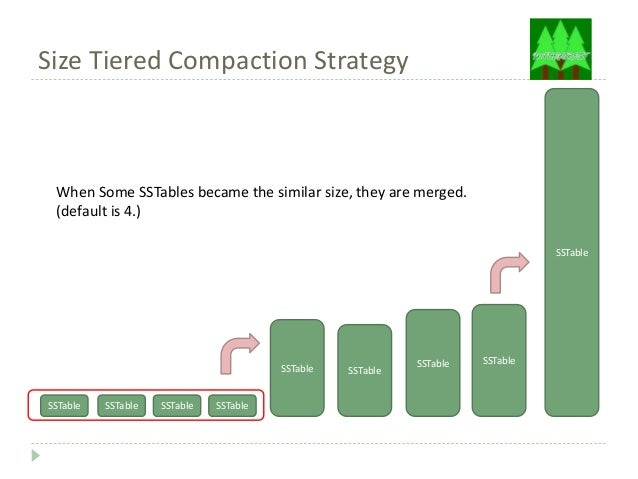
The default compaction strategy (Size Tiered Compaction Strategy)

Source: https://www.slideshare.net/tomitakazutaka/cassandra-compaction
The default compaction strategy triggers a compaction when multiple SSTables of a similar size are present. To emphasize how evil is that for log storage scenario, let's assume that a week of production logs results in 1x 168GB SSTable, 3 x 42GB SSTables, 3 x 10GB SSTables, etc. After two weeks, the biggest SSTable will be probably still 168GB . That's fine. You have tested the cluster for two weeks of production load, right? The trap is, you want to store logs for three months. Nobody will spend that amount of time hitting the test cluster with production load. After three months, the biggest SSTable will be around 672GB and month after that probably 2688GB. The compaction isn't free. It takes your CPU, it takes your disc IOPS (yes, nice sequential writes, but still). It will take your life (or rather kill your cluster with pending compactions).

Solution: Date Tiered Compaction Strategy

Source: http://www.datastax.com/dev/blog/datetieredcompactionstrategy 
The date tiered compaction strategy will simply leave, after some time, old SSTables untouched. The same situation described above will translate to having (depending on your use case) for example 10x ~268GB SSTables, or perhaps 100x ~26GB SSTables. No killing compactions on old data! Read about the details here: DateTieredCompactionStrategy: Compaction for Time Series Data and here: Date-Tiered Compaction in Apache Cassandra. Yes, queries probably will be a little bit slower.

All in all, invoking this CQL (with carefully chosen consts), will save your cluster:
ALTER TABLE myprecouslogs.myprecioustable WITH compaction = { 'class' :  'DateTieredCompactionStrategy', 'base_time_seconds':'XXX', 'max_sstable_age_days':'YYY' }
and here is how to do it on a live organism: How to change Cassandra compaction strategy on a production cluster.

BTW. Do you know that there is also anticompaction?

Thursday, May 5, 2016

Specifying requirements for live notification mechanism for systems integration purposes

Recently I've designed a mechanism to notify external systems (with which we cooperate) about changes in our system. This, obviously, can be done in multiple ways. Let's look at some considerations on a high level, some questions and how that affects our requirements.

Assumptions

  • we want to notify other, external systems, owned by someone else
  • allowed delay, between the change in our system and making the notification is around one minute
  • the change can carry multiple information and varies on the type of change
  • we expose an API which is currently used by those external systems - they fetch the changes periodically
  • the number of changes per second in our system is spiky in nature (assume 50-5000 notifications/second for now)
  • external systems will subscribe themselves for notifications
Those are real-life business assumptions, which are delivered to the designer/programmer/you/me.

Questions?

  1. How to notify external systems?
  2. What information should we pass? When is the notification delivered?
  3. How long should we wait for the response?
  4. When should we retry? 
Let's try to answer those questions.

Answers

  1. There are multiple external systems, made in multiple different technologies. The most popular and basic method of integration is just making HTTP(S) calls. Should it be GET, POST or X? Let's consider two most popular - the GETs and POSTs.
  2. We have to pass multiple values, depending on the notification type. For example, normal amount of information is: string (300 chars), 5 dates, 5 integers - therefore both GET (allowing ~2k chars on nearly all browsers and servers) and POST methods are viable. However, GET is very straightforward and simple. No issues with encoding, accepting compression or even reading the stream. What is more, GET put less pressure on your's servers as you do not have to send the body stream. Unfortunately GET query string is also visible for (nearly) everyone, therefore only-non sensitive information can be passed. What about concurrent notifications? How could one make "exactly-once" delivery model? Here is where we can use nicely one of our assumptions. Because of our API we can force external systems to fetch information through our API, after we will notify them. Such notification can be delivered in "at-least-once" model and we can provide non-sensitive, idempotent information about the change, which then can be used to get, full sensitive data from our API. One can even imagine an optimization - keep notifications to send in a buffer and delete duplicates in a small time bucket. 
  3. The obvious thing is that the longer we wait for responses the more resources are used. However, there is one more important thing. By specifying the request timeout, we can control how the architecture of the external system will look like. By saying "you have 30 seconds to process the notification" is like saying ~"you have a lot of time to get our notification, process it and synchronously ask our API then send us HTTP 200 status code". Compare it with "you have 3 seconds to store the notification for processing later or process it asynchronously". The implications are clear, short time = less required resources + better integration.
  4. We want to be sure that the notification reaches the external system and thanks to the design specified in second point we can use "at-least-once" delivery model. I see two options now: a) hit specified URL 3 times (for example), don't wait for the answer and don't send this notification ever again, b) hit specified URL, retry in X minutes if HTTP status code was different than 200. First option is very simple in implementation, however it assumes that external systems will develop a mechanism to avoid processing the same notifications multiple times - which will likely end in hitting our API three times for every single notification.

Conclusion

There we have it, answers which potentially should lead to a simple, sleek design which is relatively easy for implementation, completely fulfills the needs and requires a good design from external systems.